Build a report that keeps donors close and support strong

A simple planning system that helps community-focused nonprofit teams get their story in order, organize their data, and decide the smartest path forward before bringing in a design partner.

yes ! I want my free planner
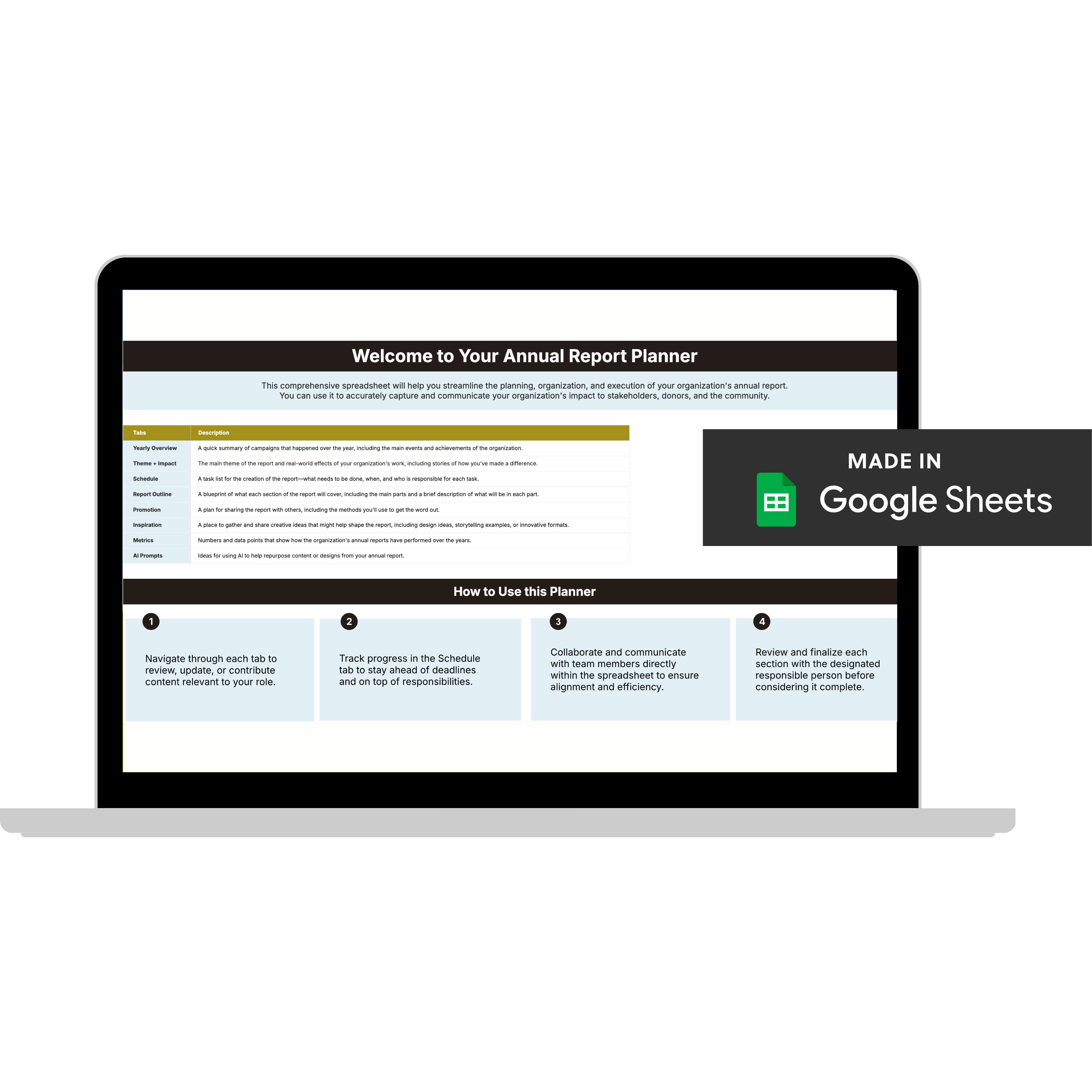
Laptop screen displaying an Annual Report Planner spreadsheet made in Google Sheets, with sections describing tabs, their descriptions, and instructions on how to use the planner.

We’ve supported nonprofit teams at organizations like:

10,000 degrees logo
abode logo
American Diabetes Association logo with red stylized 'A' and text.
chiron community foundation logo
cora logo
logo east bay
logo making waver academy
Logo with stylized blue waves above the text 'MAKING WAVES Education Foundation'.
peninsula family service logo
logo planet women
logo naccho
logo nation writing project
logo orange country community foundation
logo planet woman
tides foundation logo
wuyee logo

A practical planning tool that helps nonprofit teams plan annual reports easily and and avoid costly missteps later.

Built to help nonprofit teams get clear and focused before production begins—so design, approvals, and timelines don’t derail later.

If you’re still doing this…

Chasing team members for updates & approvals.
⬇️
Staring at multiple docs and wondering when
⬇️
Rushing last minute to pull something together for donors and board members.

Most nonprofit teams struggle with annual reports for one of two reasons: they're winging it without a plan, or they're stuck in a slow, clunky process that wasn't built for design or efficiency.

You don't have to do either anymore.

yes ! I want my free planner

Introducing the Annual Report Planner

A proven and practical system to keep your team aligned and your message clear.

Plan Your Content: Stay organized with a yearly overview and structured content prompts.

Get Team Buy-In: Assign tasks and deadlines so nothing slips through the cracks.

Finish Faster: AI-powered prompts and smart workflows save you hours.

Wow Donors: Turn your impact into a polished, story-driven report you’re proud to share.

Track What Matters: Measure year-over-year progress with space to outline key metrics and reflect on results.

Quick heads up: This planner is your foundation—it gets you organized and ready. Now, if your team's stretched thin on time, capacity, or design expertise (which, let's be honest, most are), this becomes step one before you hand things off for professional design.

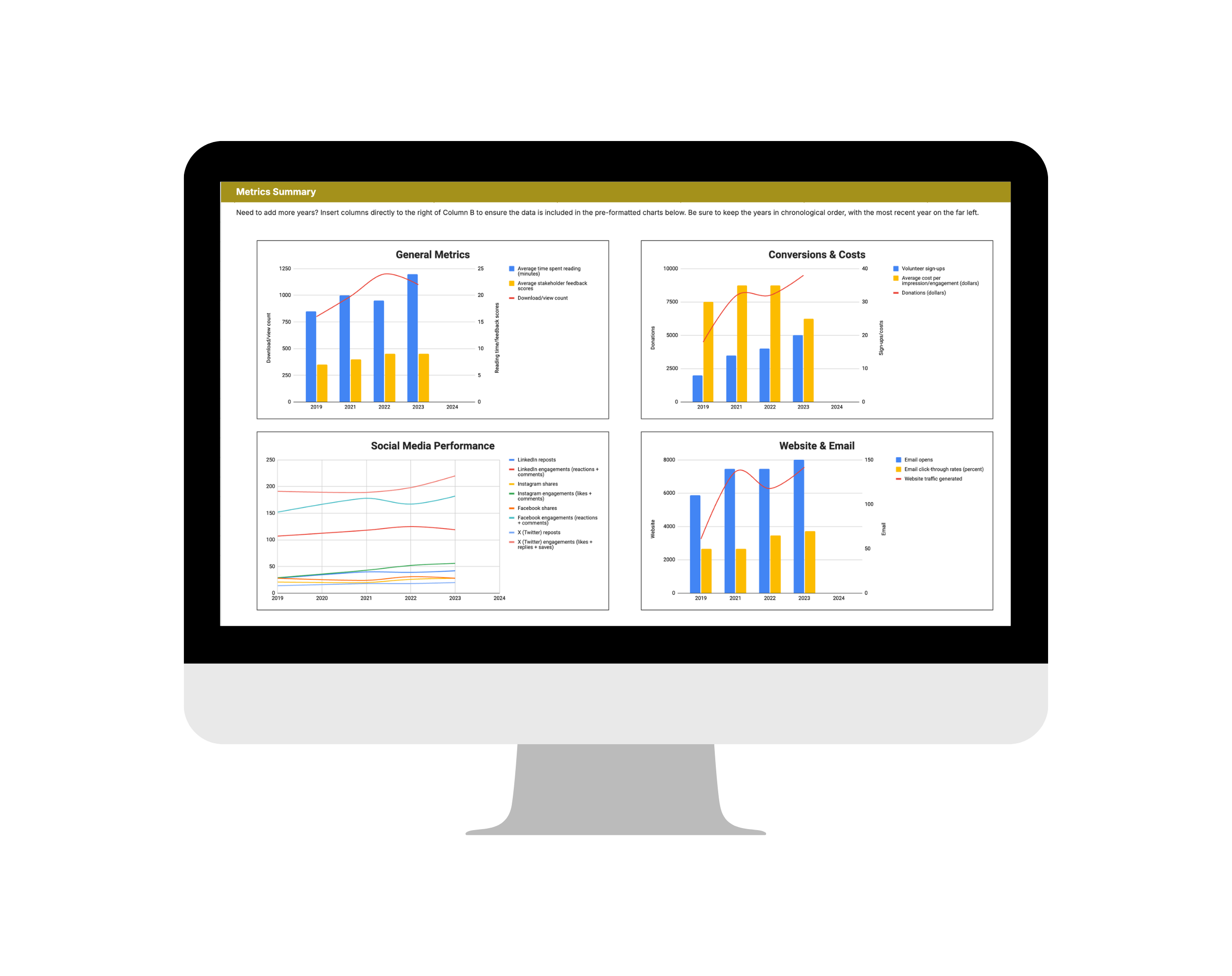
Computer screen displaying a metrics summary dashboard with four charts showing general metrics, conversions & costs, social media performance, and website & email statistics from 2019 to 2023.

Here’s everything you get inside

Join Olivia, Founder & Creative Director of Acton Circle, for a quick walkthrough of how nonprofit teams use this planner to prepare for successful annual reports.

Your free planner is just a click away 👇🏾

Questions about our Annual Report Planner? We got answers.

Who will benefit from this planner?

Perfect for anyone who wants to save time, reduce stress, and create a report that inspires.

  • First-Time Report Creators: Step-by-step guidance to make your debut report a success.
  • Busy Teams: Manage contributors and deadlines with ease.
  • Budget-Conscious Nonprofits: A professional solution without expensive tools or consultants.
  • Small But Mighty Teams: Streamline your process and focus on what matters.
  • Mission-Driven Leaders: Tell your story, showcase your impact, and stay organized.

This planner is especially helpful if you’re planning an annual report in the next 3–6 months and want to understand what’s involved before deciding whether to DIY or partner with a designer.

How do I access the planner after purchase?

You’ll get instant access via your email right after submitting your email and name in the form.

Do I need fancy design tools to use this?

Nope! It’s all built in Google Sheets. If you can open a spreadsheet, you’re good to go.

Will this work if I already started my report?

Yes! The planner helps you stay organized, refine your messaging, and track your progress—even if you're halfway through.

Can I share this with my team?

Absolutely. It’s built with collaboration in mind. You can share the planner with your internal team via Google Drive.

What if I don’t have time to use it right now?

Many teams download the planner early, then return to it once timelines and priorities are clearer.

Will I get updates if the planner changes?

Yes! Once you purchase, you’ll automatically get lifetime access to any updates or improvements we make to the planner.

What if I don’t want to DIY my annual report?

That’s completely normal. Many teams use the planner to get clear on their content and priorities, then hand the execution off to a design partner, like us. If you decide you’d like support turning your plan into a donor-ready report, our Annual Report Design Intensives are built for exactly that.