Your nonprofit's website is one of your most important assets. Most of the time, it's one of the first touchpoints for potential donors. It's also typically where supporters can find the most complete set information about your org.
If your website accidentally excludes some people (such as those who may have vision impairments), you risk losing potential supporters.
Accessibility helps nonprofits reach more people, serve their mission, and build trust. And with more people discovering your website, understanding your mission, and noticing your impact, your community grows. You connect with donors you'd never have found otherwise.
You can take it step-by-step and improve your nonprofit website accessibility over time with a clear goal and timeline. Here's how to start:
1. Use a Clear Heading Structure
A clear heading structure improves the organization of content, making it easier to scan and understand. It also enhances search engine optimization (SEO), making your website easier to rank on Google.
When it comes to maintaining an accessible website, a clear heading structure also aids screen reader users in navigating sections. The easiest way to do this with blog posts is to use H1 headings for titles and H2 headings for sections of your text.
2. Add Alt Texts to Your Images
Alt tags (alternative descriptions) are written copy that appear when an image fails to load. They also help screen-reading tools describe the image to people with visual impairments.
When writing alt texts, make sure to thoroughly describe what's in the image, including the context. And use keywords! Alt texts help search engines crawl your website better, so specific and on-topic ones can make your website perform better in organic searches.
Get The Annual Report Checkpoint
Donor Thank You Postcards Templates
Enter your info and we’ll send the postcards straight to your inbox:
3. Use Visuals to Simplify Complex Data or Ideas
When working with complex ideas or data, present the information in ways everyday readers can understand. Infographics are great tools to simplify data.
Infographics can highlight, explain, and enhance text-based information. They make it easier for donors and your community to grasp your impact, especially when you're presenting a lot of stats or figures.
That said, remember to format your infographics with your target audience's reading habits in mind. Ones that are too text-heavy or visually busy may defeat the purpose of simplifying things for readers.
4. Keep Navigation Simple and Clear
ADA compliance requires that you provide multiple ways to reach any page on your website. Navigation bars are the most effective way to do this. Add a top nav, a footer menu, and a search option.
Simple, clear navigation helps visitors with vision and cognitive impairment navigate your site and find what they're looking for. You may also create a table of contents and a sitemap for good measure.
5. Use Appropriate Text Sizes and Contrast
Accessibility also applies to the text on your website and in your documents. This doesn't mean that you have to change your brand fonts. Sometimes, simple changes, such as increasing sizes and adjusting contrasts, are more than enough.
Check out the guide below to see the ideal text sizes per device:
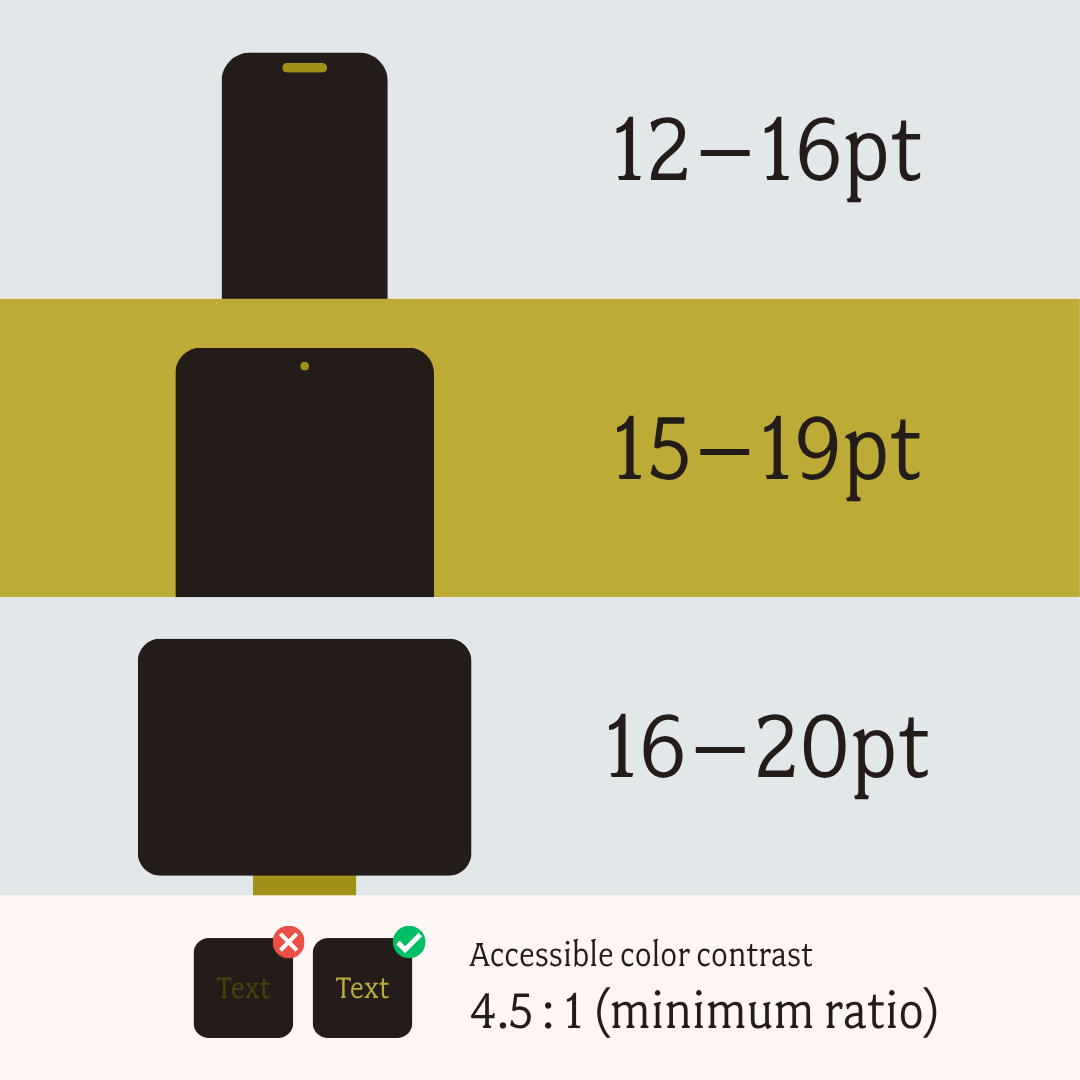
Good contrast also helps everyone read. It's particularly important for those with impaired vision or color blindness. If you're unsure about your contrast ratio, you can check it with this free color contrast checker.
6. Add Captions or Transcripts to Videos
People who are hard of hearing may have a difficult time following along with your videos, even when you speak slowly and clearly.
Add captions to your videos to make it easier for users to follow along. You may also include transcripts for users who prefer reading over watching long-form videos.
FAQs: Nonprofit Website Accessibility
Do nonprofit websites need to be ADA compliant?
Yes, nonprofit websites should maintain accessible websites to ensure ADA compliance. Courts have ruled that the ADA applies to websites and apps, and so organizations should make sure their websites are accessible to prevent litigation.
What is WCAG?
While there isn't an official set of guidelines, the Department of Justice has spoken positively of the Web Content Accessibility Guidelines (WCAG). It has numerous benefits, such as being widely used and updated regularly, and it comes with a clear success criteria.
The guidelines contain three compliance levels: A, AA, and AAA. Websites that meet the criteria of levels A and AA are usually considered to be accessible for people with disabilities. Each level builds upon the other; you can't meet level AA requirements fully without also meeting level A requirements.
How can I test my website's accessibility?
There are many website checkers you can use to ensure ADA and WCAG compliance. If you're unsure about your website, check with this free website checker to identify and troubleshoot errors.
Microsites, Annual Reports, and Accessibility
ADA compliance and accessibility can feel overwhelming, especially for a growing nonprofit. You want to include everyone. You don't want to accidentally exclude a potential community member or donor. But making sure everything is just right with your text, design, descriptions? That's usually too time-consuming for an internal team.
So if accessibility is on your 2026 checklist, let our team handle it. Our expertise is professional, engaging design with humans always at the center. Book a call to discuss how we can start working together.